Support
Asking for Help
⏱️ Support Availability
- Hours: 08:00–14:00 GMT+1 (UTC+01:00)
- Unavailable: Weekends & Swedish public holidays
✅ Before You Ask
1. Check You’re a Verified Customer
Support is only available to verified customers.
👉 Follow this guide: Verify product ownership
2. Include Logs With Your Request
Logs are essential. Without them, we cannot help. They provide:
- Engine version
- Hardware info
- Called functions
- Crash callstack (if applicable)
How to include logs:
- Reproduce the issue
- Close the project
- Attach the newly generated logs
⚠️ Avoid sending large or outdated logs.
3. Provide Detailed Information
Be specific. Instead of “Feature X isn’t working,” include:
- Operating System
- Unreal Engine version
- Plugin version
- Running in Editor or Packaged?
- Relevant Blueprint screenshots
- Logs from the
/Saved/Logs/directory
4. Read the Documentation
Most reported issues are already covered in the plugin documentation. Please review it thoroughly.
5. Check the Example Projects
Each plugin includes an example project to demonstrate basic functionality.
🚫 Do not use these in production — they are for learning only.
6. Use the Discord Server
Verified customers gain access to private support channels on Discord.
📌 Tip: Use the search function — most questions have already been answered!
⚙️ Common Misconfigurations
Many issues are caused by incorrect setup in DefaultEngine.ini.
This file:
- Defines which subsystem the engine should use
- Provides plugin credentials
✅ Ensure your configuration matches the documentation and example project.
🚫 Unrelated Questions
We cannot provide support for issues unrelated to our plugins, such as:
- “How do I replicate player names?”
- “How do I configure Steam Achievements?”
- “Where do I get a Steam App ID?”
For non-plugin topics, please consult the official documentation of services like Steam or Epic Online Services.
You may still ask in Discord, but support is not guaranteed.
📁 Where to Find Your Logs
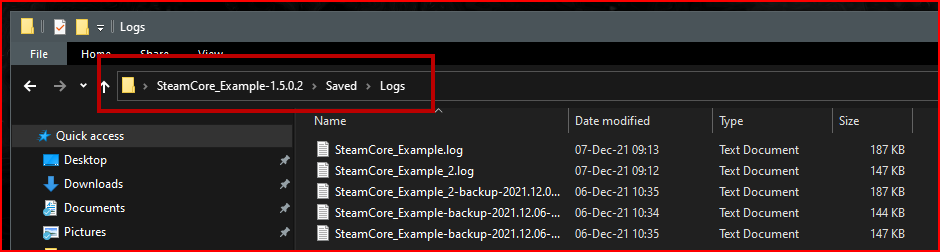
Logs are always generated in your project’s Saved directory.
File names may differ, but the principle remains the same.
Which logfile should I include?
Editor:
- PIE (Play In Editor): Send
SteamCore_Example.log - Standalone Game in Editor: Send
SteamCore_Example_2.log(the editor generates a separate log file for Standalone sessions)
Packaged Project:
- Logs are located in the
Saveddirectory (see example screenshot).

🖼️ Blueprints
If your issue involves your own project, please also include screenshots of your Blueprint logic.